
Written sections
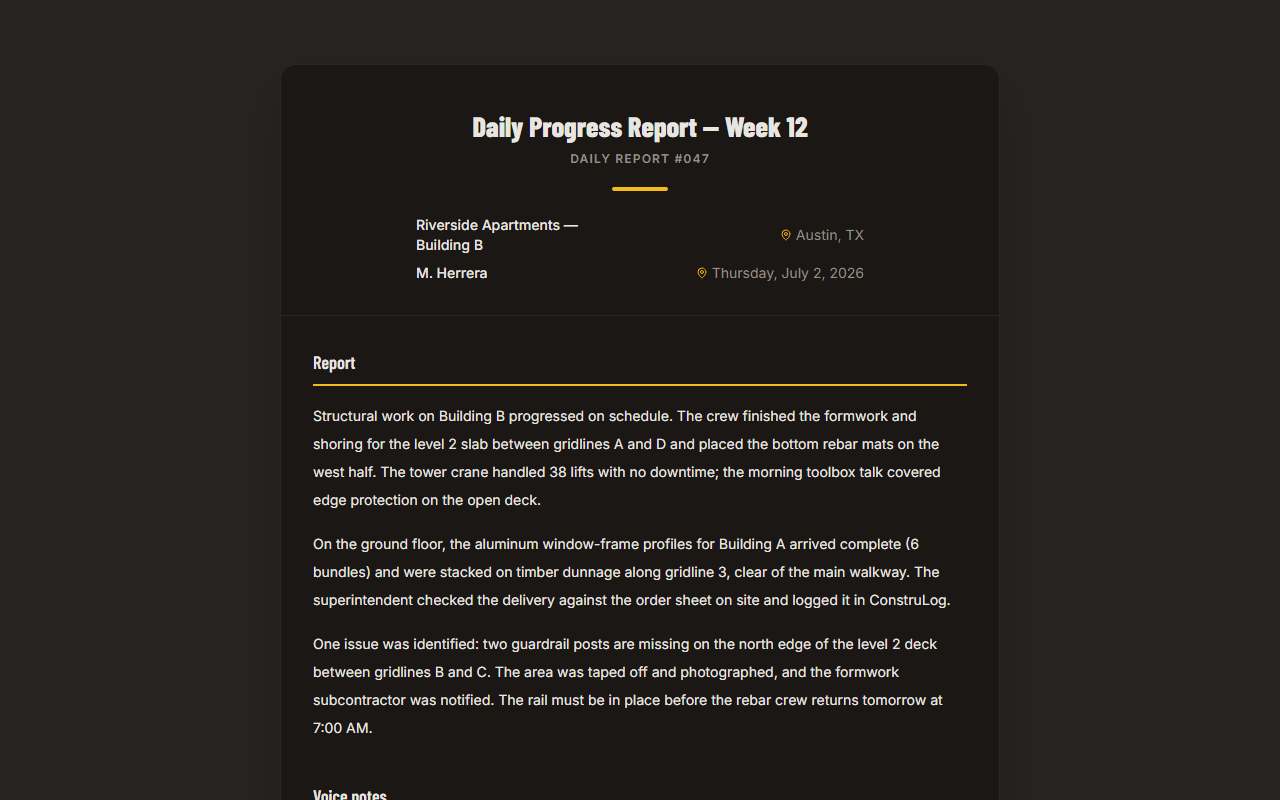
Executive summary, observed work, safety observations, quality observations, issues and risks, pending items, recommendations and notes on the evidence used.
Take photos and record voice notes during the shift. At the end of the day ConstruLog turns them into a daily report draft: what was done, what was seen, safety and quality findings and open items. You review it, fix what needs fixing and send a PDF to the client.
The problem
Most daily reports are written at night, from memory, by the person who was busiest all day. The photos are in a camera roll mixed with personal pictures, the notes are in a chat group, and the report ends up as three vague lines that nobody can use when a client asks what happened on Tuesday.
A useful daily report is not hard to define: the work performed, who and what was on site, the weather, problems and safety issues, and what is pending for tomorrow, each backed by dated photos. What makes it hard is the typing. ConstruLog moves that work to the moment you are on site: you capture evidence while you walk, and the writing starts from that evidence instead of from a blank page.
How it works
You capture on the phone (iOS or Android) and can review and send from the phone or the web dashboard. The AI writes; you decide what goes out.
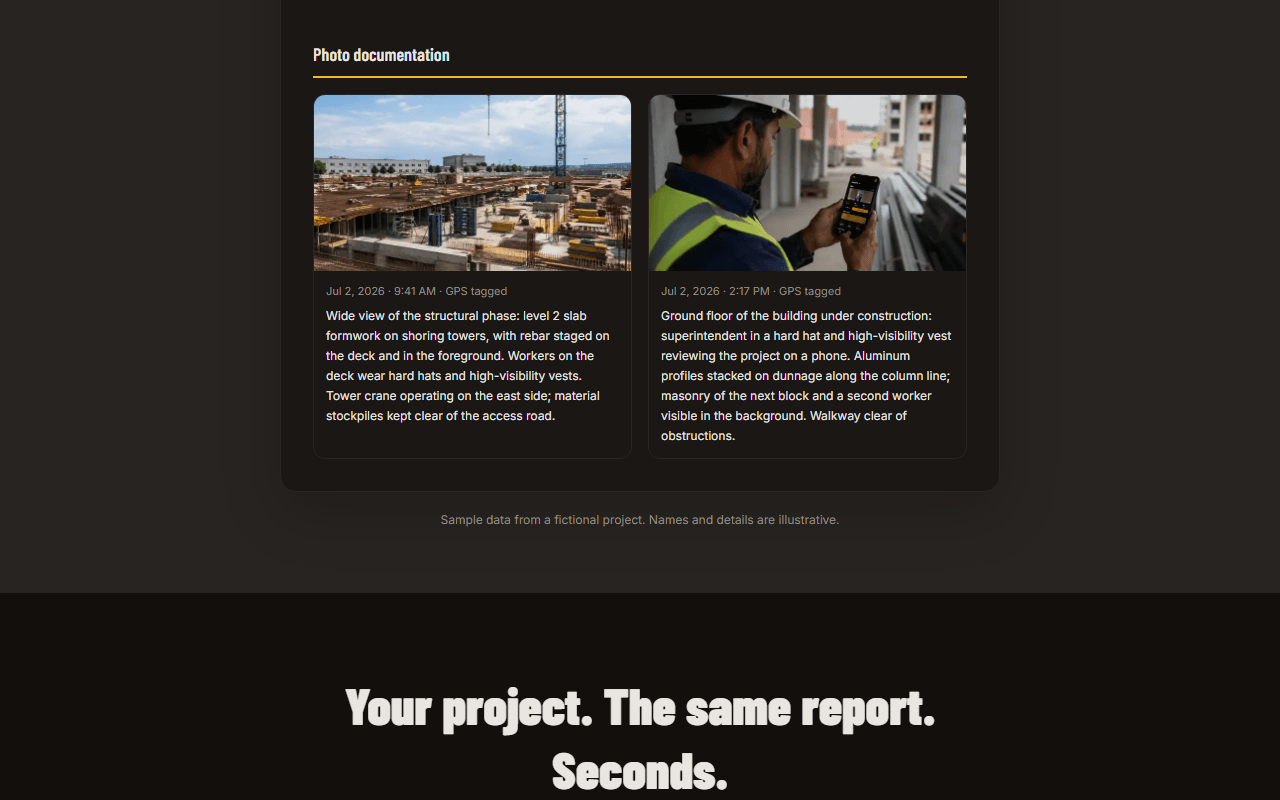
Take photos and short videos from the app inside the project. Each photo keeps its capture date and time and, when you allow location, its GPS position and street address. Add a voice note instead of typing, leave comments on photos and tick checklist items as you go.
Each photo can be analyzed: a short description, the construction stage, visible elements, and safety and quality findings, each with a severity (low, medium, high or critical) and a recommended action. Voice notes are transcribed in the language you spoke.
One tap in the app writes the daily log from that day’s photos, voice notes and comments. For a fuller report you pick the type (daily, weekly, final, incident or general), the length and the tone, and the AI drafts it from the photo descriptions, comments, transcripts, checklists and a selection of the site images themselves.
What goes into a report
The report is structured, so the people who read it find the same sections every day.
Executive summary, observed work, safety observations, quality observations, issues and risks, pending items, recommendations and notes on the evidence used.
Each photo in the PDF shows its capture date and time, the address or coordinates and, if you want, its AI description. The location is stored with the photo; it is not stamped onto the image.
When at least one photo of the day has a location, the daily log adds conditions, minimum and maximum temperature, rain and wind from Open-Meteo. Without a located photo it is written without weather instead of guessing.
Transcripts of your voice notes, team comments on photos and checklist progress are part of the evidence the AI writes from, and can be included in the PDF.
Review and delivery
Every report starts as a draft, and nothing reaches a client until you send it. You can rewrite the narrative and the title, choose whether the photo descriptions appear in the appendix, and switch off sections you do not need, such as videos or checklists. The PDF carries a short note that it was prepared with AI assistance and reviewed by whoever issued it.
Each report gets a sequential number per project (#001, #002…) on the cover. From the report you can download the PDF or a Word file, send it by email, or create a share link that the client opens in a browser without an account. You see when a sent report has been viewed. On paid plans the client can also sign it from that link: they type their name and draw a signature, and the signed report records the date and an audit trail.
No signal on site
Basements, rural lots and new buildings often have no signal. In the ConstruLog app you can keep taking photos and videos without a connection: each capture is saved on the phone and queued before the camera closes, so it survives even if the app is closed. When the connection comes back, the queue uploads by itself.
Writing the report needs a connection, because the AI runs on our servers. In practice that means you capture all day offline and generate the daily log once you are back on Wi-Fi or mobile data.
Plans
Free is a plan, not a trial: it does not expire and needs no credit card. It covers 1 active project with 3 AI reports, 20 AI photo analyses and 10 minutes of voice notes every month. A daily log counts as one AI report.
| Plan | Price / month | Active projects | Seats | AI reports | Photo analyses | Voice minutes |
|---|---|---|---|---|---|---|
| Free | Price / month$0 | Active projects |
Who it is for
FAQ
Yes. The Free plan does not expire and does not ask for a credit card. It includes 1 active project and, every month, 3 AI reports, 20 AI photo analyses and 10 voice-note minutes. Free PDFs carry a small ConstruLog header; paid plans remove it.
No. The AI writes a draft from your photos, voice notes, comments and checklists. You read it, correct anything that is wrong and send it. Nothing is sent until you do it.
Free resources
Prefer to start on paper or in a spreadsheet? These are free and need no account.
Upload a few photos from today and read the draft the AI writes. No account, no card.
Free plan that does not expire · No credit card
The report is saved as a draft. Edit the text and the title, then download a PDF or Word file, email it to the client from the app or share a link that opens without a login.
The AI is instructed to write only what the evidence supports. When a photo is dark or blurry, the image quality is flagged and activity is reported as not confirmed rather than invented.
Reports, daily logs and photo analysis can be written in 22 languages, including English and Spanish, whatever language the app is in.
| Seats1 |
| AI reports3 |
| Photo analyses20 |
| Voice minutes10 |
| Solo | Price / month$29 | Active projectsNo cap | Seats1 | AI reports30 | Photo analyses300 | Voice minutes120 |
|---|
| Pro | Price / month$59 | Active projectsNo cap | Seats5 | AI reports90 | Photo analyses600 | Voice minutes300 |
|---|
| Teams | Price / month$99 | Active projectsNo cap | Seats12 | AI reports150 | Photo analyses900 | Voice minutes400 |
|---|
Yes. On the free generator page you upload a few jobsite photos and get a written report draft without an account or card. If you like it, you create a free account to save it, edit it and download the PDF.
Photo and video capture works offline: everything is queued on the phone and uploads when you are back online. Generating the report needs a connection because the AI runs on the server.
A PDF or Word file, an email sent from the app, or a link that opens in any browser without an account. On paid plans the client can sign the report from that link.
On the daily log, yes, when at least one photo of the day has a GPS location: the weather for that place and day comes from Open-Meteo. If no photo has a location, the log is written without weather.
Free and Solo are for one person. Pro and Teams include several seats, let you invite collaborators to a project as viewers or contributors, and show a team activity feed.
Learn how to write a construction daily report section by section, with weak vs. strong example entries and a free template you can fill in today.