Construction Daily Log Template: Free PDF, Word and Excel Download
A construction daily log is the running record of a job site day, written one short, timed line at a time: what happened, where, and who was responsible. This free template gives you a weather block, 18 timed entry lines, a manpower summary, a remarks box and a sign-off, in PDF, Word and Excel. Below you will find what each part is for, a table that separates a daily log from a daily report and a diary, a filled example of one fictional day, and the habits that keep a log reliable. No signup is needed to download it.
Choose the format that matches how your crew works. All three files hold the same sections in the same order, so a foreman writing on paper and a superintendent typing into Excel are keeping the same log.
Free download
Construction daily log template
Free to use and edit. Direct download — no email, no account.
The template is free to use and modify, and each page carries a small construlog.com footer with a page number. It is a plain form, not software: you fill it in by hand or by typing, and nothing is sent anywhere.
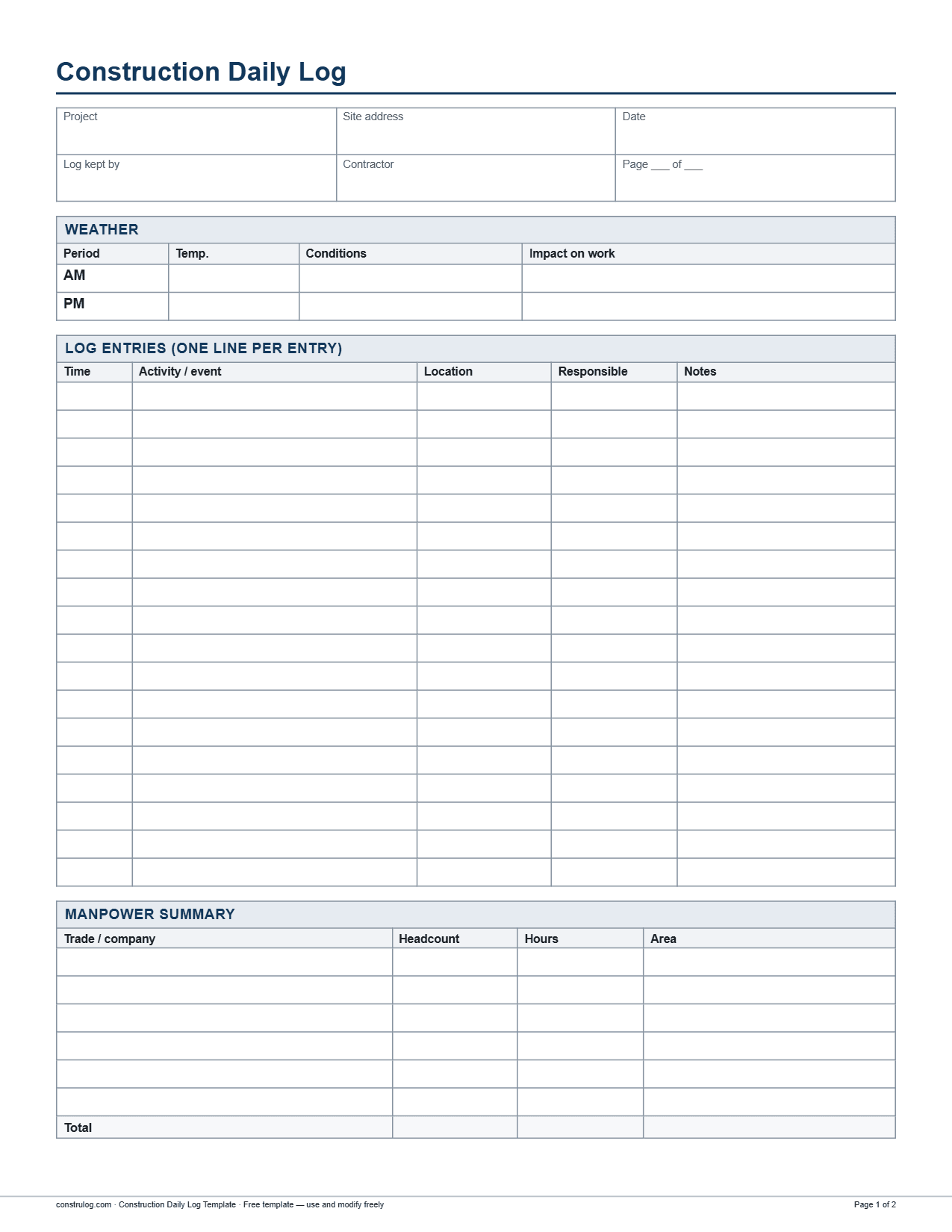
Page one of the PDF: header fields, weather, timed log entries and the manpower summary.
What is inside the template, section by section
The log is built around one idea: you write a line when something happens, not a summary at the end of the day. The form is short on purpose so that it stays usable on a busy site.
1Header (6 fields): project, site address, date, log kept by, contractor, and a "Page ___ of ___" field for logs that run past one page.
2Weather: one row for AM and one for PM, with temperature, conditions and the impact on work. Use the impact column to record lost hours and which trades were affected.
3Log entries: 18 rows with five columns: time, activity or event, location, responsible, and notes. One event per line.
4Manpower summary: six rows with trade or company, headcount, hours and area, plus a total row for headcount and hours.
5Remarks: a three-line box for anything that does not fit a timed line, such as a pending decision or a heads-up for tomorrow.
6Sign-off: two blocks, "Logged by" and "Reviewed by", each with name, signature and date.
There is no separate safety record, equipment table or photo grid in this form. If you need those, use the longer construction daily report template, which has sections for them. Safety talks, near misses and photos taken still go in the log as timed entries.
PDF, Word or Excel: which one should you use?
The layout is the same in all three. What changes is how each file behaves once you start writing in it.
How the three file formats of the daily log differ
How the three file formats of the daily log differ
PDF
Word (.docx)
Excel (.xlsx)
Best for
Printing and writing by hand on site
Typing, and changing the form (add a row, rename a column)
Typing on a laptop, one file per day
Weather conditions
Blank cell to write in
Blank cell to write in
Drop-down list (clear, partly cloudy, overcast, rain, snow, fog, windy); you can still type something else
Log entries
18 blank rows
Daily log vs daily report vs diary: what is the difference?
People use these words loosely, and a contract or an owner may define them differently. The table shows the distinction most sites work with. If your contract names one of them, use that name and follow the format it asks for.
Daily log, daily report and diary or journal compared
Daily log, daily report and diary or journal compared
Daily log
Daily report
Diary or journal
Purpose
A running, time-ordered record of events as they happen
A structured summary of the whole day, covering fixed topics
A personal notebook of observations, reminders and conversations
Typical length
One short line per event, one to two pages for the day
One to three pages, with every section filled in
Free-form; as long or short as the writer likes
Who writes it
In short, the log is the raw material and the report is the summary built from it. Keep a log during the day, then write the report from it. If you want that second step, the guide on how to write a construction daily report shows weak and strong entries for each section.
A filled daily log example (fictional day)
The example below is invented, including the project, the companies and the names. It shows one Tuesday on a tenant improvement job: a small medical clinic build-out in an existing building, with two suites under construction. Every time, headcount and hour figure is consistent between the entries and the manpower summary, so you can check the arithmetic.
Header and weather (fictional example)
Header and weather (fictional example)
Field
Entry
Project / address
Harbor Street Clinic TI, 220 Harbor St
Date
Tuesday, April 14
Log kept by / contractor
D. Ruiz, superintendent / Ridgeline Builders
Weather AM
41 F, clear. Impact on work: none
Weather PM
58 F, partly cloudy. Impact on work: none
Log entries (fictional example, 12 of the 18 lines used)
Log entries (fictional example, 12 of the 18 lines used)
Time
Activity / event
Location
Responsible
Notes
6:45
Site opened, barricades and temporary power checked
Entry and Suite 120
D. Ruiz
No issues
7:00
Toolbox talk on ladder use, 9 attendees
Suite 120
D. Ruiz
Framing 4, electrical 3, Ridgeline 2
Manpower summary (fictional example)
Manpower summary (fictional example)
Trade / company
Headcount
Hours
Area
Ridgeline Builders (superintendent and laborer)
2
18
Site-wide
Northline Framing
4
32
Suite 120
Brightwire Electric
3
24
Suites 120 and 130
Read it as someone who was not there. The order of events is clear, and the inspection correction, the damaged board and the verbal request are written down with a time, a name and a next step. The hours add up, using round figures that ignore lunch breaks: the superintendent was on site from 6:45 to 16:45 (about 10 hours) and the laborer for about 8, which makes 18; four framers at 8 hours make 32; three electricians at 8 make 24; two plumbers at 6 make 12; the total is about 86 hours for 11 people. The entries are short, specific and written in the order they happened. That is what makes a log useful months later.
How to keep a construction daily log
The routine below keeps a log short and accurate. The rule behind all of it is simple: write the line close to the moment it happens.
1Set up the log before the first day. Fill in the project, address, contractor and your name, and decide who keeps the log when you are away.
2Open the day with the weather and the headcount. Record temperature and conditions in the morning, and count the crew by trade and company as they arrive.
3Write one line per event, with the time. Deliveries, inspections, visitors, instructions, stoppages, injuries or near misses, and the start and finish of key work each get their own line.
4Name the place and the person. Put the area in the location column and the company or individual in the responsible column. "Framing, Suite 120, Northline" is useful; "work continued" is not.
5Record verbal instructions and promises. Write who asked, what they asked and what the next step is, for example an RFI or an email to follow.
Habits that make a log hold up
Use the same wording every day. If you call it "Suite 120" on Monday, do not call it "the north suite" on Tuesday.
Prefer facts over opinions. "Two sheets with damaged corners, photographed" is a fact. "Bad delivery" is a judgment.
Log the quiet events too. A day with no incidents is worth one line, since it shows you looked.
Keep the original. If you copy a paper log into a spreadsheet or app, keep the paper version. The original is the record.
Review it weekly. A quick look through the week shows patterns, such as a trade that is always late or a delivery that is always short.
When a paper log is enough, and when an app helps
A printed form or a bound daily log book works well for one site with one person responsible for it. It costs almost nothing and needs no training. It gets slower when you run several sites, when notes live in a notebook only one person can read, or when photos end up scattered in a phone gallery.
ConstruLog can help with that part. You take photos and voice notes on site with the mobile app, and the daily log feature generates a draft of two to five paragraphs from that day: work performed, personnel, materials and equipment observed, weather, safety and quality, and open items for the next day. It is a narrative draft, not a table of timed entries like the template above, so use it as a starting point and edit it before it goes out. Each photo keeps its capture time, so you can rebuild the order of events from them. Weather comes from the coordinates of the first geotagged photo of the day; if no photo has GPS, the log is written without weather. The report can be exported as a PDF or Word file and shared by link.
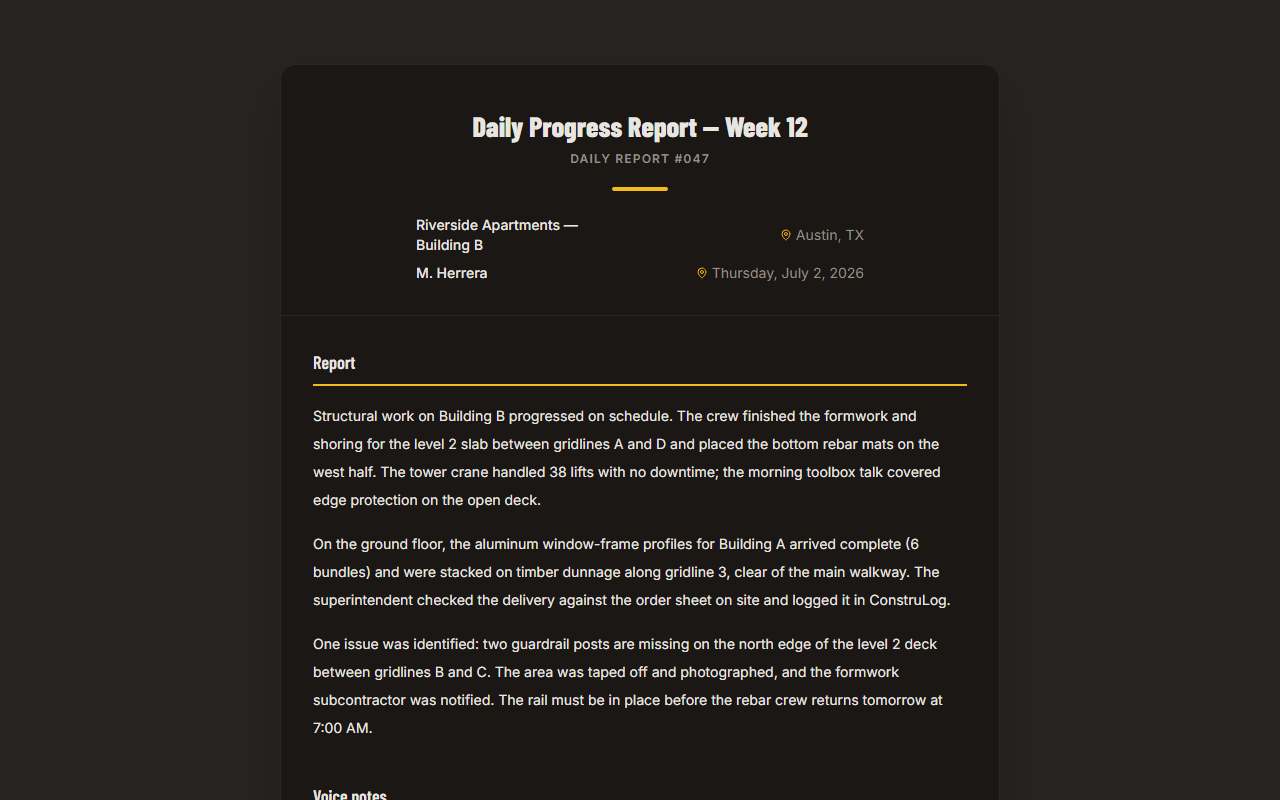
A sample ConstruLog report: project details and a written summary generated from site photos.
Add rows where you need them. If a busy day needs more than 18 entry lines, continue on a second page and use the "Page ___ of ___" field. In Word, insert rows rather than squeezing text.
Keep the Excel totals working. In the manpower summary, insert new trade rows inside the table, above the last trade row, so the total formula expands to include them. A row added below the last trade row falls outside the sum. The sheet uses merged cells, so check the layout after inserting.
Rename columns to match your contract. If your owner says "work area" or "cost code", use their word so the log matches their paperwork.
Keep the order. The sequence runs from the conditions of the day (weather), to the events, to the people on site, to the sign-off. Changing it makes logs harder to compare.
Frequently asked questions
What is a daily log in construction?
A construction daily log is a running, dated record of what happens on a job site during the day. Each entry is a short line with a time, what happened, where and who was responsible. It also usually records the weather and the crews on site.
What is the difference between a daily log and a daily report?
The log is the time-ordered record kept through the day, one line per event. The report is a structured summary written at the end of the day and sent to others, with fixed sections such as labor, equipment and safety. Many sites write the report from the log. See the construction daily report template for the report format.
What should a construction site daily log include?
At a minimum: project and date, weather, timed entries for deliveries, inspections, visitors, instructions, delays and key work, the crews on site with headcount and hours, remarks for open items, and a signature. The template on this page has each of these.
Can I use a daily log book instead of a printed form?
Yes. A bound book works as long as you keep the same fields every day: date, weather, timed entries, manpower and a signature. The template is useful as a layout to copy into a book, or as a form you print and keep in a binder.
Is there a free daily log sheet in Excel?
Yes. The template on this page is free in Excel, Word and PDF. The Excel file has a drop-down list for weather conditions and a total row for headcount and hours, and it needs no account.
How do I write a daily log entry?
Write the time, then one clear statement of what happened, where, and who did it, and add a note with the next step if there is one. For example: "10:15, delivery of 62 sheets of gypsum board, loading dock, ticket 48213, 2 sheets damaged." Keep it factual and avoid opinions.
Should the weather go in the daily log?
Yes. Weather is a common reason for lost time, so record temperature and conditions in the morning and the afternoon, and use the impact column to note which hours or trades were affected. A specific reading is more useful than "bad weather".
Can ConstruLog keep my daily log?
ConstruLog can draft a daily work log from your photos, voice notes and comments for the day, as two to five paragraphs with weather when a photo has GPS. It is a narrative draft you review and edit, not a timed-entry table, so it complements the template rather than replacing it. See pricing for the limits on each plan.
The total row adds up the headcount and hours columns for you
Sign-off
Lines to sign by hand
Lines to sign by hand
Cells for name, signature and date; print the sheet to sign it
← Swipe sideways to see every column →
The superintendent, foreman or site engineer on duty
Usually the superintendent or site manager
Whoever keeps it; often the superintendent or project manager
When it is written
Throughout the day, at the time of each event
At the end of the day, from the notes and the log
Whenever the writer has a minute
Who reads it
The site team, and the project manager when needed
The project manager, the owner or their representative
Usually only the writer, unless it is requested later
What it is good for
Reconstructing the order of events and the exact times
Reporting progress, labor, equipment and safety to others
Memory aid and context; weaker as a formal record
← Swipe sideways to see every column →
7:00
Electrical rough-in continues: conduit and boxes
Suites 120 and 130
Brightwire Electric
Started with the toolbox talk
7:15
Framing crew starts the corridor partition
Suite 120
Northline Framing
Layout checked against the plans
7:30
Plumbers arrive and begin drain rough-in
Suite 130
Coastal Plumbing
Briefed on site rules on arrival
10:15
Delivery of 62 sheets of 5/8 in. Type X gypsum board
Loading dock
Ridgeline laborer
Ticket 48213. 2 sheets with damaged corners, noted on the ticket and photographed
11:30
Owner's representative walks Suite 120
Suite 120
P. Shah (owner)
Asked to move one outlet on the reception wall. Verbal only; RFI to be sent by the PM
13:30
Plumbers leave. Drain rough-in done in Suite 130
Suite 130
Coastal Plumbing
Supply lines to follow tomorrow
14:00
City electrical rough-in inspection
Suite 120
Inspector Okafor
Correction notice: nail plates missing at 3 studs. Re-inspection requested for tomorrow
14:45
Nail plates installed at the 3 locations
Suite 120
Brightwire Electric
Photos taken before closing the wall
15:30
Framing, electrical crews and laborer leave. Corridor partition framed
Suite 120
D. Ruiz
Drywall starts once re-inspection passes
16:45
Superintendent walks the site and locks up
All
D. Ruiz
Gypsum board stored flat in Suite 130
← Swipe sideways to see every column →
Coastal Plumbing
2
12
Suite 130
Total
11
86
← Swipe sideways to see every column →
6Update the weather and manpower in the afternoon. Note any hours lost and adjust the headcount for people who left early or arrived late.
7Close the day. Use the remarks box for open items, complete the manpower totals, then sign and have it reviewed.
8Never rewrite an entry. If you made a mistake, a common practice is to draw one line through it, add your initials and the date, and write the correct entry beside it.