How to Write a Construction Daily Report: Section by Section, With Examples
A construction daily report is only as useful as the entries in it. A blank template does not tell you what to write in the box marked "Work performed," and "framing continued" will not help anyone six months from now when a delay claim lands on your desk. This guide walks through every section of a daily report, shows a weak entry and a strong entry side by side, and includes the steps to write one in about fifteen minutes. The examples all come from one fictional project so you can see how the sections fit together. You can fill in the free construction daily report template as you read.
What is a daily report in construction, and who reads it?
A construction daily report is a dated record of what happened on the job site that day: who was there, what they did, what arrived, what was inspected, what went wrong and what is waiting on someone else. It is usually written by the superintendent or the project engineer at the end of the shift, and it is signed or reviewed by the project manager or the owner's representative.
Think about who will read it later. Your project manager reads it to know whether the schedule is holding. The owner reads it to see that the money is being spent on real work. And if there is ever a dispute over a delay, a change or an injury, the daily reports are often the first documents anyone asks for, because they were written at the time and by the person who was on site. A good report answers the question "what actually happened on March 11?" without anyone having to guess.
Daily report or daily log: does the difference matter?
In practice the two terms overlap, and many crews use them interchangeably. A common distinction is that the daily log is the running diary kept on site (often in a bound book or an app), while the daily report is the structured, signed summary that goes to the project manager or the owner. If your contract names one of them, use that word and match the format it asks for. If it does not, pick one format, use it every day and keep it consistent across the whole job.
The writing checklist: what to put in each section
The table below goes section by section. The third column shows the kind of entry that gets written when someone is in a hurry. The fourth shows an entry that a stranger could rely on. All of the entries describe the same fictional day on the same fictional project: Birch Street Townhomes, a two-building, wood-frame project in the framing phase, contract day 34, on a Tuesday in March. The names, tickets and numbers are invented for illustration.
Daily report writing checklist, with weak and strong example entries (fictional project: Birch Street Townhomes)
Daily report writing checklist, with weak and strong example entries (fictional project: Birch Street Townhomes)
Section
What to write
Weak example
Strong example
Header
Project name and number, site address, date, day of the week, contract day, report number, your name and title.
Birch St, Tuesday
Birch Street Townhomes, report no. 28, Tuesday, March 11, contract day 34, prepared by J. Alvarez, superintendent.
Weather
Temperature range, conditions, wind, and whether weather stopped or slowed work. Say how many hours and which trade.
Cold, clear
AM 38 F clear, PM 54 F partly cloudy, wind 8 mph from the northwest. No time lost to weather.
Seven habits that make a daily report hold up
1Write it the same day. Memory fades fast, and a report written two days later looks like it was reconstructed, because it was. Block ten minutes before you leave the site.
2Use numbers and places. Quantities, locations, unit numbers, ticket numbers and times turn an opinion into a record.
3Stick to facts. Write what you saw and what was said. Leave blame, speculation and sarcasm out. Someone may read this report out loud in a meeting or a hearing.
4Write down the bad days. Rain delays, no-shows, rework and rejected inspections belong in the report. A report that only ever says "good progress" is not believed when it matters.
5Name who and when. An open item with no owner and no date is just a worry. "Architect to answer RFI 12 by Thursday" can be followed up.
How to write the report in 15 minutes, step by step
Order matters. Fill in the parts that are just facts first, then spend your thinking time on the narrative.
1Collect your raw notes during the day. Take photos at set points in the day, jot headcounts when crews check in, and keep delivery tickets in one place.
2Fill the header and the weather. These take two minutes and are the least controversial part of the report.
3Count the crew and the equipment. Get headcount and hours from each foreman, not from memory.
4Write the work performed by area. One line per area or activity, with a quantity or a clear stopping point.
5Log deliveries, inspections and visitors. Copy the ticket numbers and inspector names while the paperwork is in your hand.
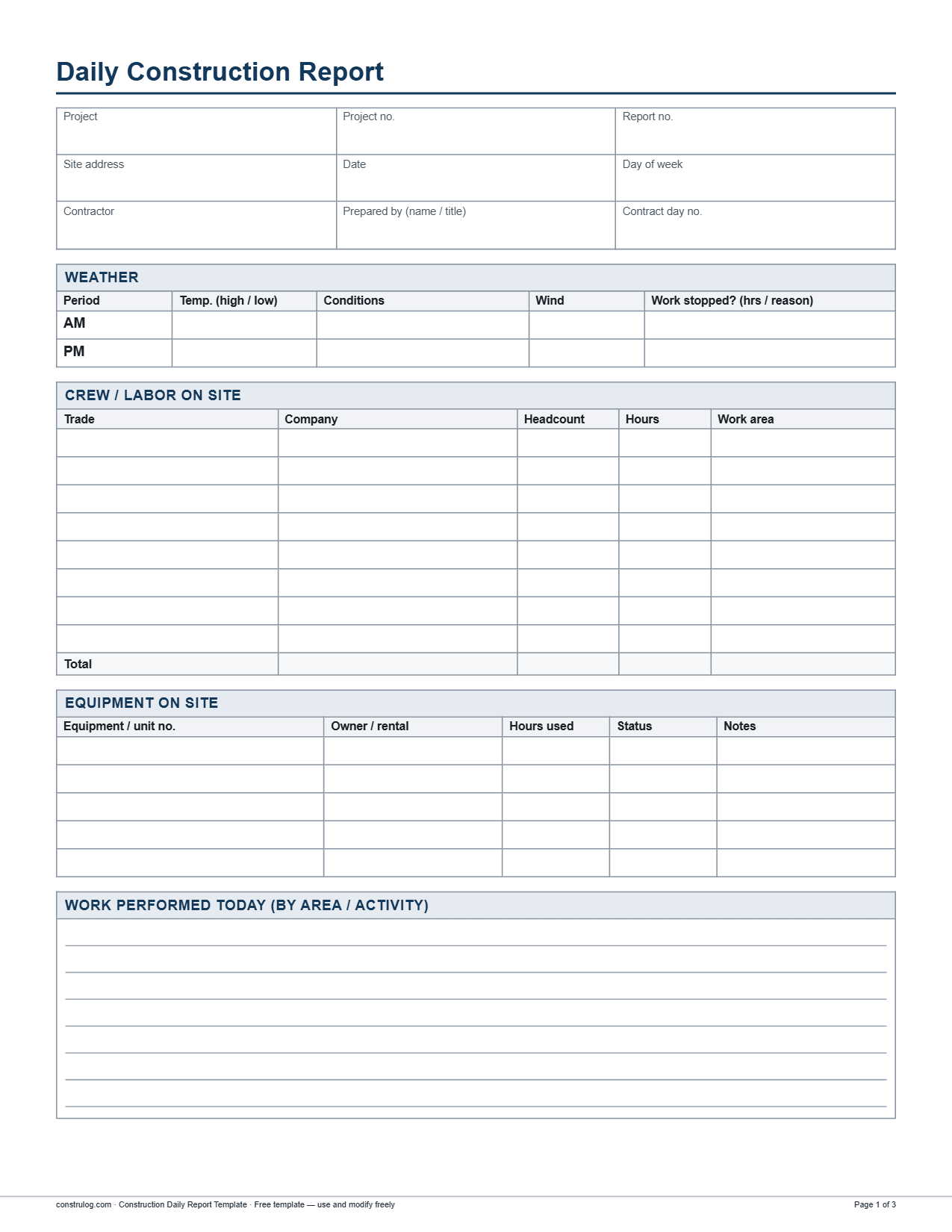
First page of the free construction daily report template (PDF). The Word and Excel versions have the same sections.
A template that already has these sections
The free construction daily report template follows the order used in the checklist above. Its header holds nine fields: project, project number, report number, site address, date, day of the week, contractor, who prepared it (name and title) and the contract day number. It then has a weather table with AM and PM rows (temperature high and low, conditions, wind, and a field for work stopped, with hours and reason), a crew table with eight rows (trade, company, headcount, hours, work area) with totals for headcount and hours, an equipment table with five rows (status: working, idle or down), a work performed box, a materials delivered table with four rows (quantity, supplier, ticket or PO number, condition), an inspections and visitors table with four rows, and a safety record with checkboxes for no incidents, near miss, first aid, recordable injury, property damage and toolbox talk held. It closes with a delays and open items box, four photo slots with caption and GPS/time fields, and signature blocks for the superintendent who prepared it and the project manager or owner's representative who reviewed it.
Free download
Construction daily report template
Free to use and edit. Direct download — no email, no account.
A daily report tells the story of one day. Over a month it also becomes the raw material for progress reporting and quality records. If you keep your descriptions specific, you can pull percent-complete numbers straight from them; our guide on how to track construction site progress shows a weighted method for that. Findings that come up while you walk the site, such as a failed inspection or a rework item, are easier to close out when they also appear in a quality log; see how to monitor construction site quality.
Drafting the report faster with ConstruLog
Writing the report is mostly collecting facts, and the facts are already in your phone. In ConstruLog you take site photos in the mobile app; each one is saved with its capture time and, when you allow location access, its GPS position and address. You can also record voice notes, which are transcribed, and add comments. At the end of the day, one tap generates a daily log of two to five paragraphs from that day's photos, voice notes and comments: work performed, personnel, materials and equipment observed, weather, safety and quality, and open items for the next day. It is saved as a draft report of type daily.
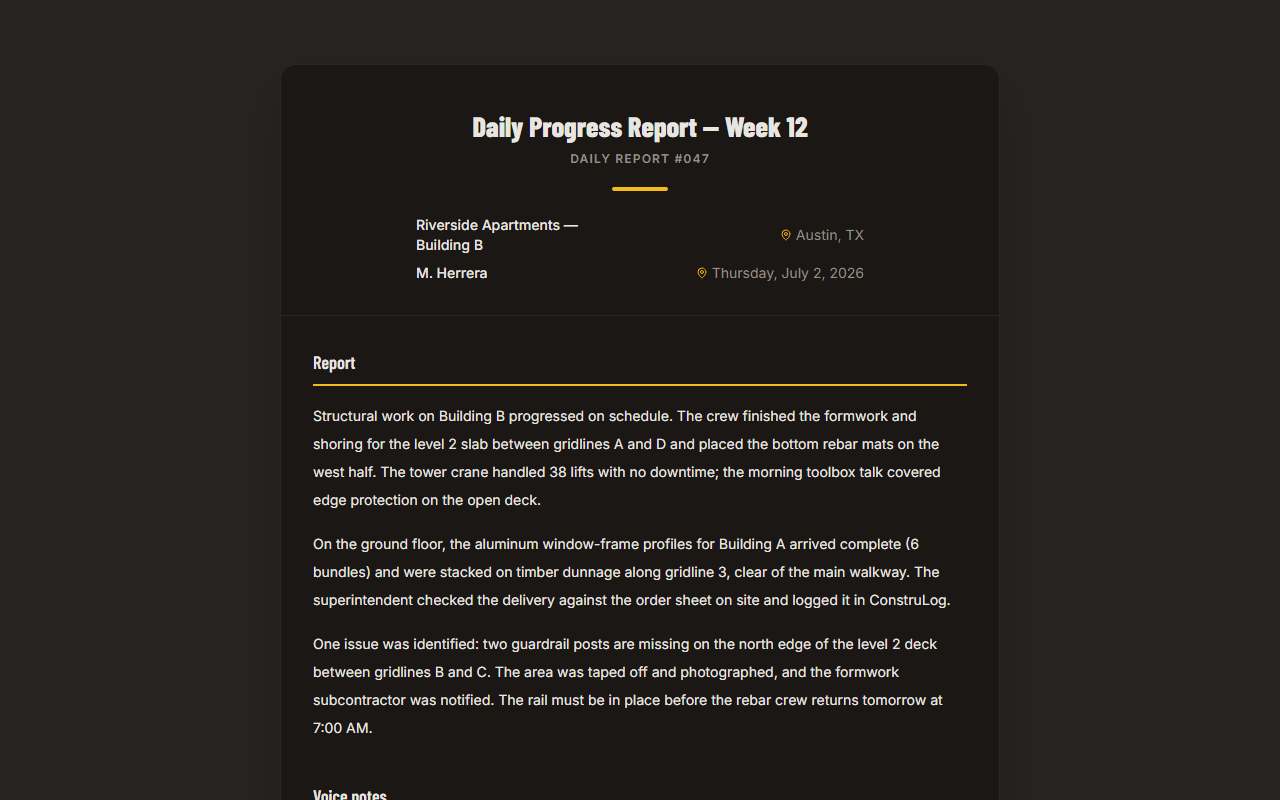
Weather is filled in from the coordinates of the first geotagged photo of the day. If no photo has GPS, or the weather lookup fails, the log is written without weather. The draft is yours to review and edit before it goes anywhere, and the PDF carries a note that it was prepared with AI assistance and reviewed by its issuer. It does not replace your headcounts, ticket numbers or signatures, so keep taking those down. You can write the log in any of 22 languages, including English and Spanish. Read more about the approach on how the AI works, or see a finished report in the demo report.
A sample generated report: project summary on top, photo documentation below.
The Free plan costs $0, needs no credit card, and includes 1 active project and 3 AI reports per month. See pricing for the other plans.
Common mistakes to avoid
Copy-paste entries. Identical text for ten days in a row suggests nobody looked. If the work really is the same, say what changed: the area, the quantity, the crew.
Missing headcounts. Disputes about labor and productivity often start with the crew table. Hours are easy to leave blank and hard to rebuild.
Opinions about other trades. Write "drywall delivery was two hours late," not "the drywall guys are useless."
Leaving out good news. Passed inspections and early finishes count, too. They show a pattern of performance.
Late or batched reports. Writing a week of reports on Friday is how errors get in.
Photos without captions. A photo with no place and no description is hard to use later. Add a short caption when you take it.
Frequently asked questions
What is a daily report in construction?
It is a dated record of one day on the job site: weather, crews and hours, equipment, work performed, deliveries, inspections, safety, delays and open items, usually with photos and a signature. The superintendent or project engineer writes it, and the project manager or owner's representative reviews it.
How do I write a daily report for a construction project?
Write it the same day, in the same order every time: header, weather, crew and equipment, work performed by area, deliveries, inspections, safety, delays and open items, then photos and signatures. Use quantities, places and times, and stick to facts. The checklist table above shows weak and strong entries for each section.
How long should a construction daily report be?
As long as it takes to be specific, usually one to two pages. A quiet day can be short. A day with deliveries, inspections and a delay needs more. Length does not matter as much as whether each entry names a quantity, a place or an owner.
What should I include in a construction superintendent's daily report?
Weather, crew counts and hours by trade, equipment, work performed by area, materials delivered, inspections and visitors, safety record, delays and open items, captioned photos, and the name and signature of the person who prepared it. Add contract day number and report number so the series is easy to audit.
Is there a free construction daily report template?
Yes. The free construction daily report template on this page comes as PDF, Word and Excel. It has the header, weather, crew, equipment, work performed, materials, inspections, safety, delays, photos and signature sections, and you can adapt it to your contract's requirements.
Who is responsible for writing the daily report?
On most projects it is the general contractor's superintendent or project engineer. Subcontractors often keep their own daily records for their crews. Your contract says who must submit reports, in what format and how often, so check it before you build your own process.
Can I write a daily report on my phone?
Yes. You can fill in a template on a phone, or capture photos, voice notes and comments in the ConstruLog mobile app and let it draft the daily log for you. You review and edit the draft before sharing it. Photos taken offline are queued on the phone and upload when you have a connection again.
What is the difference between a daily report and a daily log?
The terms overlap, and many crews use them interchangeably. A common distinction is that the log is the running site diary, while the report is the structured summary sent to the project manager or owner. Use the term and format your contract asks for.
Each trade, the company, headcount, hours worked and where they worked. Add up headcount and hours at the bottom.
Framers and electricians on site
Framing, Ridgeline Framing, 6 people, 48 hrs, Building B level 2. Electrical rough-in, Brightline Electric, 2 people, 16 hrs, Building A level 1. Cleanup, GC laborer, 1 person, 8 hrs. Total 9 people, 72 hrs.
Equipment
Unit number, owned or rented, hours used and whether it was working, idle or down.
Lift on site
Telehandler unit 2208, rental, 6 hrs, working, used to set wall panels at Building B.
Work performed
Activity by area, with a measurable quantity or a clear stopping point. Say what was finished, not just what was started.
Framing continued
Ridgeline framed and braced the north and east exterior walls on level 2 of Building B, about 180 linear feet. Level 2 floor sheathing complete. Walls on the south side not started. Brightline Electric roughed in receptacle and switch boxes on Building A level 1. GC laborer cleaned up debris at both buildings.
Materials delivered
Material, quantity, supplier, ticket or PO number, delivery time and condition on arrival.
OSB delivered
11:40 AM, 24 sheets of 7/16 in. OSB wall sheathing from Harbor Lumber, ticket 48213, received undamaged and stored under tarp at Building B.
Inspections and visitors
Time, who came, which agency or company, what they looked at and the result. Note any corrections required.
Inspector came, OK
9:30 AM, city building inspector R. Chen, framing inspection of Building A level 2. Passed, no corrections. Inspection card signed and left at the job box.
Safety
Check the record: no incidents, near miss, first aid, recordable injury, property damage, toolbox talk held. Describe anything that is not "no incidents" and what was done about it.
Safe day
No incidents. Toolbox talk held at 7:00 AM on ladder and edge protection, 9 attendees signed in. Guardrail at the level 2 stair opening re-secured by Ridgeline before work started.
Delays, issues and open items
What is stopping work or could stop it, who owns the next move and by when. Reference RFI numbers where they exist.
Waiting on windows
Window delivery moved by the supplier from Friday to next Wednesday. No impact on framing this week; Building A windows are needed by the following Monday. RFI 12 (beam size at Unit 2B) still open, answer needed from the architect by Thursday.
Photos
Four or more photos, each with a caption saying what and where, plus the time (and GPS, if you have it).
IMG_2041.jpg
Building B level 2 north wall, braced, 3:10 PM. Building A level 2 after inspection, 9:50 AM. OSB delivery staged and covered, 11:55 AM. Stair opening guardrail after repair, 7:20 AM.
Sign-off
Name, signature and date of the person who prepared it and the person who reviewed it.
(blank)
Prepared by J. Alvarez, superintendent, March 11. Reviewed by project manager the next morning.
← Swipe sideways to see every column →
6Do not overwrite yesterday. If you find an error, add a correction on the next report instead of changing the old one, so the record shows what you knew at the time.
7Take photos while you work. Photos taken during the day take a few seconds each and make the written entries easier to check.
6
Record safety, delays and open items. Add owners and dates for every open item.
7Attach captioned photos and sign. Four captioned photos are better than twenty uncaptioned ones. Sign and date it, and send it to the project manager.