How to Monitor Construction Site Quality: A Practical Method and Checklist
Quality problems on a job site are rarely a surprise to the people who walk it every day. They become expensive when nobody wrote them down, nobody photographed them, or nobody followed up. This guide gives you a repeatable way to monitor construction site quality: what to inspect, what counts as acceptable, what evidence to capture, and how to close every issue. It includes a construction quality control checklist you can copy straight into your own forms, and a free photo report template for the evidence.
Monitoring quality is not the same as a final inspection. A final inspection tells you what went wrong after the work is covered up. Monitoring means checking the work while it is still visible and cheap to fix, comparing it with a written standard, and keeping proof that you did. Three things have to be true for it to work: the standard is written down before the work starts, the check happens at a fixed point in the sequence, and the result is recorded in a way someone else can read next month.
The standard usually comes from the drawings, the specifications, the manufacturer instructions and the local code. Your job as superintendent, GC project engineer or quality lead is to turn those documents into short, checkable statements such as "rebar cover is as shown on the structural drawings" (example only; the real value depends on the design) or "anchor bolts are at the layout marks". If an item cannot be checked with a tape, a level or a camera, it is not yet an acceptance criterion.
The 7-step method to monitor construction site quality
The steps below work for a single-family renovation and for a multi-trade commercial job. Only the number of inspection items changes.
1Write the acceptance criteria first. Pull measurable requirements out of the specs and drawings for each trade. One line per criterion, with the number or tolerance.
2Place the hold points. Decide which inspections must happen before the next trade can start, for example before pouring, before closing walls, before backfilling.
3Walk the work on a fixed rhythm. Daily for active trades, plus a deeper weekly walk with the foreman or sub. A routine beats heroic inspections.
4Capture evidence at every check. Take wide shots for location and close shots for the detail. Photos with date, time and position are far easier to defend later.
5Classify what you find. Give each issue a severity so people know what stops work and what goes on the punch list.
6Assign, fix and re-inspect. An issue is closed only when someone re-checks it against the same criterion and takes a new photo.
7Report on a schedule. Send the owner or client a short report with findings, open items and what was closed since last time.
Construction quality control checklist (copy-ready table)
Use this table as a starting point and replace the criteria with the numbers from your own project documents. Values shown are typical examples, not a substitute for your specifications or local code. Each row ties an inspection item to a criterion and to the evidence that proves the check happened.
Construction quality control checklist: inspection item, what to check, acceptance criterion and evidence to capture
Construction quality control checklist: inspection item, what to check, acceptance criterion and evidence to capture
Inspection item
What to check
Acceptance criterion
Evidence to capture
Layout
Grid lines, offsets and benchmarks against the drawings
Within the tolerance stated in the specs; marks match the latest drawing revision
Wide photo of the marks with a tape in frame; note the drawing revision used
Excavation and subgrade
Depth, width, bearing surface, standing water, loose material
Reaches the design elevation; no soft spots or water at the bearing surface
What evidence to capture so a quality record holds up
A photo proves quality only if someone else can tell what it shows, where it was taken and when. Good habits cost seconds at the time and save arguments later.
Wide first, then close. One shot that shows the location in context, then one close shot of the detail. A close shot alone is hard to place.
Put a scale in frame. A tape, a level or a ruler turns "looks about right" into a measurement.
Photograph before it is covered. Rebar before the pour, rough-in before the board, waterproofing before the backfill. You cannot go back for these.
Record date, time and position. Phone cameras store these as metadata. ConstruLog stores the capture time and GPS position (when location permission is on) with each photo and prints them next to the photo in the PDF report. They are saved as data, not stamped onto the image.
Add a one-line note. What is it, which area, what is the issue. Voice notes work well when your hands are busy.
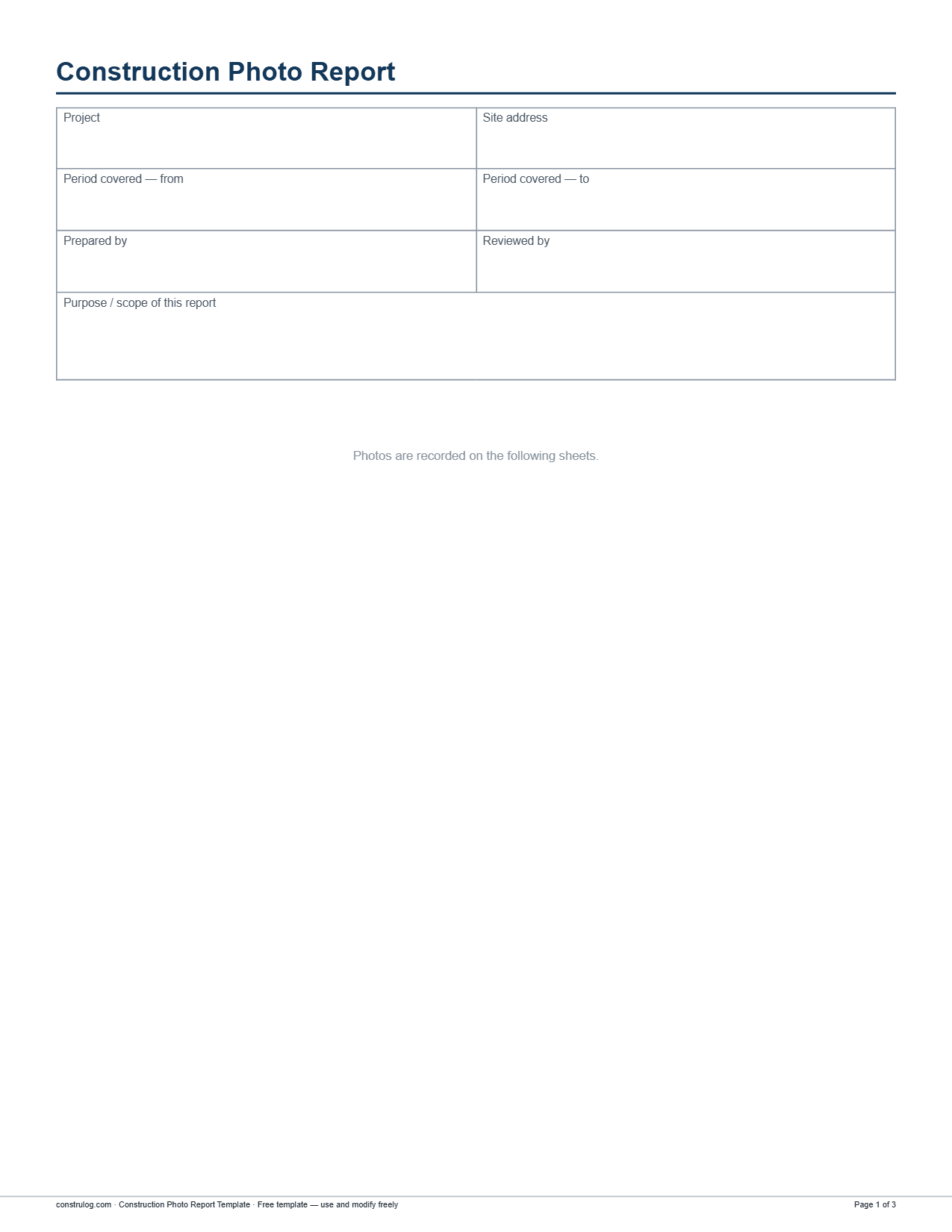
The free photo report template starts with a cover block for project, address, period and reviewer.
How to rate and prioritize quality findings
If every issue is "urgent", none are. Use one severity scale across the whole project and write down what each level means so every inspector rates the same way. A four-level scale is enough for most jobs.
A four-level severity scale for quality findings
A four-level severity scale for quality findings
Severity
Meaning
Typical response
Low
Cosmetic or minor; no effect on function or the next trade
Add to the punch list; fix before close-out
Medium
Out of tolerance but correctable without rework of other trades
Assign an owner and a date; re-inspect
High
Likely failure of the specified performance or a hidden defect risk
Fix before the work is covered; notify the superintendent
Critical
The same four labels are used by the free photo report template below, so findings you log on paper or in a spreadsheet line up with findings logged in an app.
Free template: construction photo report
The Construction Photo Report Template is a ready-made evidence log. It opens with a cover block for project, site address, period covered (from and to), prepared by, reviewed by, and the purpose or scope of the report. The photo log that follows holds up to 12 numbered photos across two pages, 6 per page in two columns. Each photo has fields for date and time, GPS, location or area, a description, a finding and a recommendation. In the PDF and Word versions the finding field comes with a severity choice (Low, Medium, High or Critical), shown as check boxes in Word. The Excel version is a table with separate columns: number, date and time, GPS, location or area, description, finding, severity and recommendation.
Free download
Construction photo report template
Free to use and edit. Direct download — no email, no account.
Example: how AI photo findings fit into quality monitoring
Writing a clean observation for every photo is the part most teams skip. ConstruLog can analyze a photo when you ask it to and return a structured result. For quality and safety, each finding has three fields: an observation, a severity of low, medium, high or critical, and a recommendation that names a concrete action. The analysis also reports an image-quality level (good, limited or poor) and lowers its confidence when a photo is dark or blurry, so a bad photo is flagged instead of guessed at.
Illustrative example of the finding fields (invented content, not a real inspection)
Illustrative example of the finding fields (invented content, not a real inspection)
Field
Example entry
Observation
Exposed rebar at the slab edge with visibly reduced cover
Severity
high
Recommendation
Measure cover at the edge and compare with the structural drawings before the pour; correct the chairs if short
Image quality
good
Treat these results as a draft for you to review. The inspector still decides what is acceptable, because the software cannot see your specs or measure the work. What it saves is the typing: you keep walking and photographing, and the observations and recommendations are waiting when you sit down to write the report. You can see how this looks in the demo report, and read more about the approach in how the AI works.
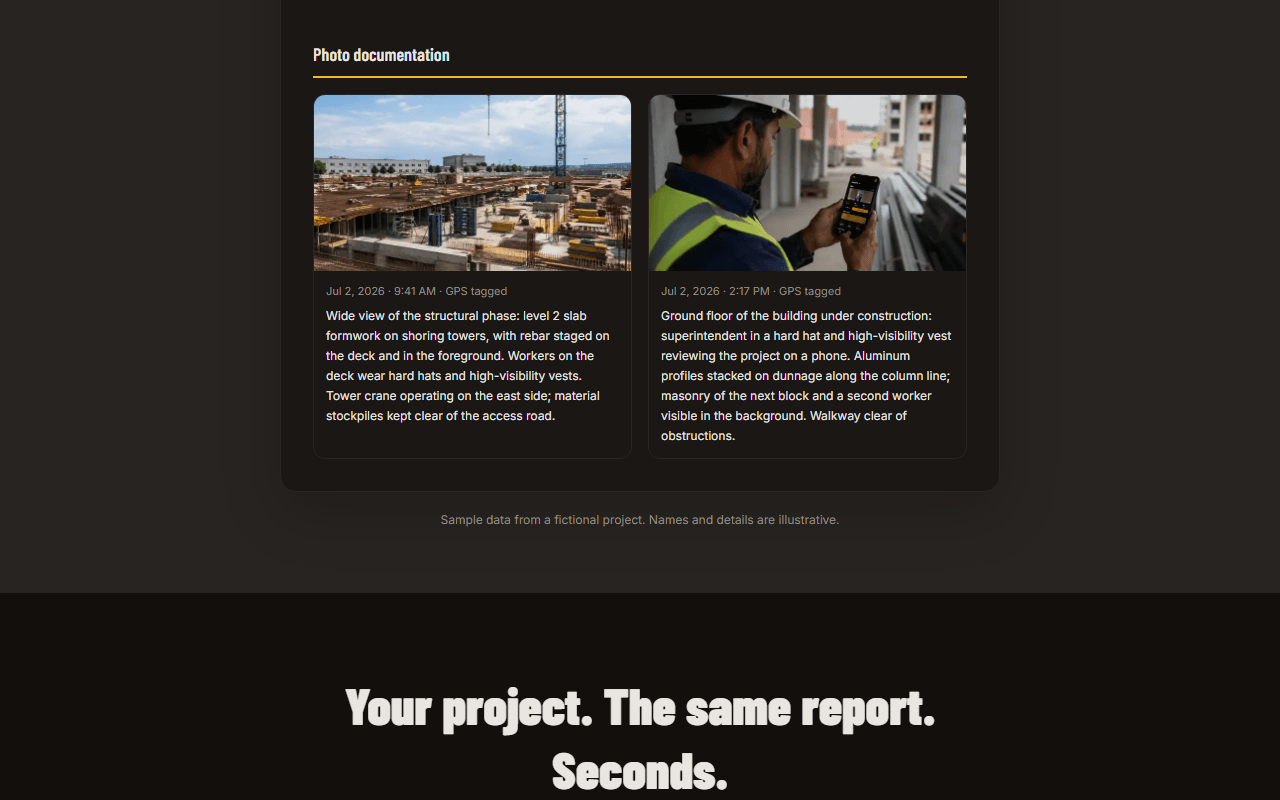
The photo section of the ConstruLog sample report, with the AI description of each photo. The content is demo data.
Keeping the checklist and the photos together
The weakest point of most quality systems is the gap between the checklist and the photos. They live in different places and nobody connects them. In ConstruLog, a checklist item can be marked required, given a due date and assignees, and have reference or verification photos attached, and checklist completion shows up in the project activity feed. You can also record a voice walkthrough and have it turned into a structured checklist. One limit to know: only photo and video capture is queued while you are offline, so creating checklists and reports needs a connection.
Turning inspections into a report the client reads
A quality report should answer four questions in under two minutes: what was inspected, what was found, what is still open, and what is needed from the reader. Lead with a short summary, list findings by severity, then show the photos. Keep the tone factual and tie every statement to a photo or a measurement.
The construction photo report template page explains the layout in more detail. If you use ConstruLog, the report generator assembles the narrative, comments, checklists and photos into a PDF or Word file, and the result opens as a draft so you can edit the text before it goes out. Free reports carry ConstruLog branding; paid plans can use your own logo. See pricing for current plans and limits.
Frequently asked questions
How do you monitor construction site quality?
Write measurable acceptance criteria from the specs and drawings, set hold points before work is covered, inspect on a fixed rhythm, photograph every check with a scale in frame, rate each finding by severity, and close issues only after a re-inspection. Report the results on a regular schedule.
What is a construction quality control checklist?
It is a list of inspection items, each with what to check, a pass or fail criterion and the evidence to capture. The table in this guide is a template you can copy and fill with the numbers from your own specifications.
What is the difference between quality control and quality assurance in construction?
Quality control is the hands-on checking of work against requirements, such as inspections and tests on site. Quality assurance is the system around it: the plan, procedures, training and audits that make the checks consistent. This guide focuses on the control side, the daily monitoring.
How often should you inspect construction quality?
Check active work every day and do a deeper walk with the foreman or sub at least weekly. Add hold-point inspections whenever work is about to be covered, such as before a concrete pour, before closing walls or before backfilling.
What photos should I take to document construction quality?
Take a wide shot for location and a close shot for the detail, with a tape or level in frame. Prioritize anything that will be hidden later, like reinforcement, rough-in, waterproofing and insulation. Add a short note on what the photo shows.
How do I document construction site conditions to reduce liability?
Keep dated, located photos and written notes for each inspection, record who inspected and what was found, and keep proof that issues were fixed and re-checked. Consistent records are what you rely on in a dispute. Ask your attorney or insurer about specific requirements for your contracts.
Can an app check my work and replace an inspector?
No. ConstruLog can analyze photos you choose and return observations, a severity and a recommendation, but those are drafts for you to review. It cannot read your project specifications, and it does not replace required inspections or professional judgment.
Is there a free construction quality control checklist or photo report template?
Yes. The table in this guide can be copied directly, and the Construction Photo Report Template is a free download in PDF, Word and Excel formats. You can also try a report in your browser from the try page without creating an account.