Construction Daily Report Example: Three Complete Samples by Job Type
Most daily report samples online are a blank form or a three-line paragraph. Neither shows you what a finished report looks like when a superintendent has filled in every section with real detail. This page gives you three complete, fictional examples for different kinds of jobs (a residential remodel, a commercial tenant improvement and a sitework job), each one built on the sections of our construction daily report template. After the examples, an annotated table explains what makes them good, and you can download the blank form to write your own. If you are looking for guidance on the writing itself, see .
All three reports below are fictional. The companies, people, ticket numbers and quantities are invented to show structure and level of detail, and they are not taken from a real project. Each example follows the same order as the blank form: header, weather, crew and labor, equipment, work performed, materials delivered, inspections and visitors, safety, delays and open items, photos and sign-off. In every crew table, the Hours column is the total labor hours for that row (headcount times hours worked), and the total row adds up both columns. The numbers are meant to add up, so you can check the math as you read.
Free download
Construction daily report template
Free to use and edit. Direct download — no email, no account.
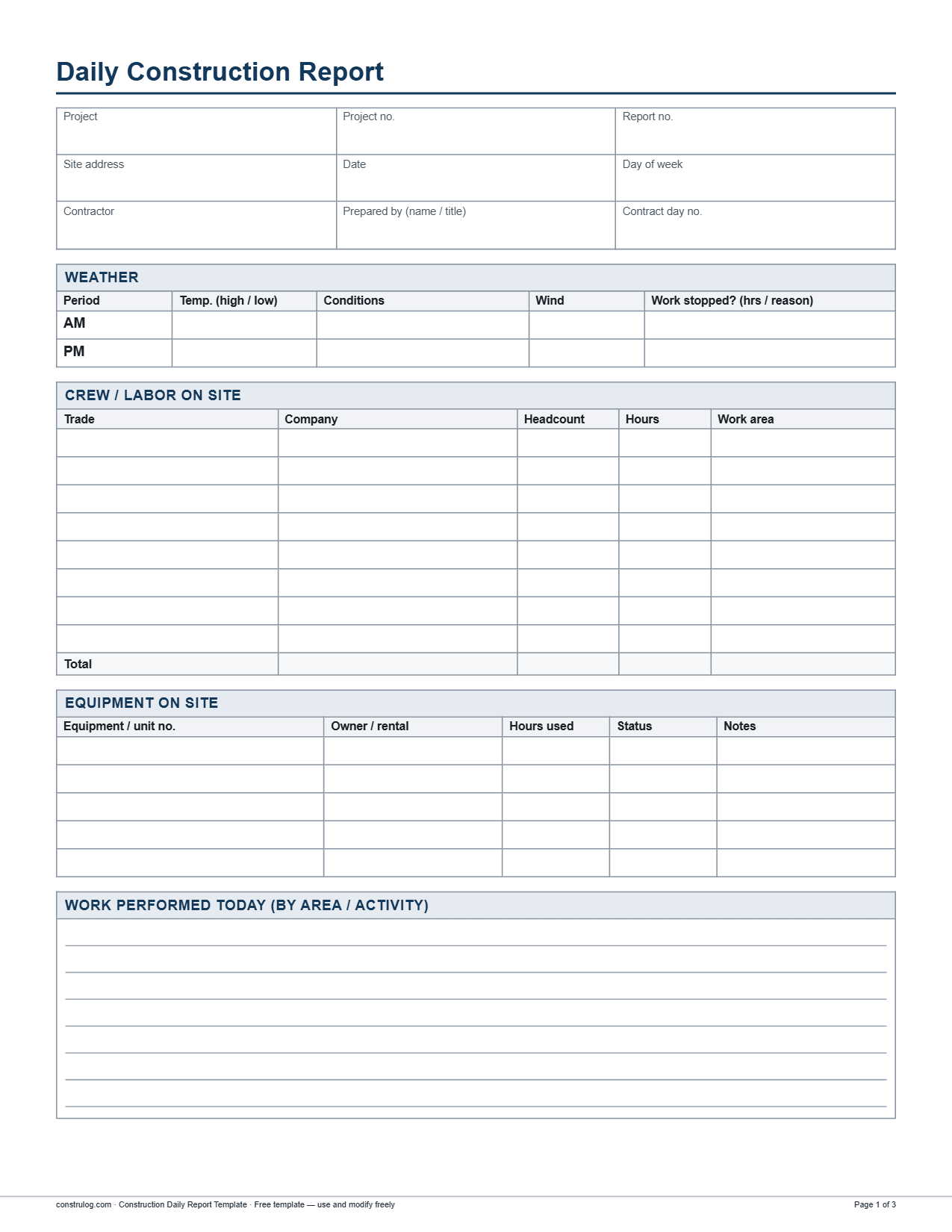
Page one of the blank template PDF: header, weather, crew and labor, and equipment.
Example 1: Residential kitchen and bath remodel
An interior remodel of a kitchen and hall bath in an occupied house, with a small crew, where most of the value is in recording which trade did what, which inspection is next and what the homeowner asked for. This day is in rough-in, so the report leans on trade coordination and deliveries.
Example 1 header (fictional)
Example 1 header (fictional)
Field
Entry
Field
Entry
Project
Oakridge Kitchen and Bath Remodel
Project no.
HB-2611
Report no.
23
Date
March 10, 2026
Day of week
Tuesday
Contract day no.
23
Site address
418 Alder Lane (fictional)
Contractor
Hartwell Builders
← Swipe sideways to see every column →
Example 1 weather
Example 1 weather
Period
Temp. (high / low)
Conditions
Wind
Work stopped? (hrs / reason)
AM
58°F / 48°F
Clear
5 mph NW
No
PM
66°F / 58°F
Partly cloudy
8 mph W
No
← Swipe sideways to see every column →
Example 1 crew and labor on site
Example 1 crew and labor on site
Trade
Company
Headcount
Hours
Work area
Superintendent
Hartwell Builders
1
8
Kitchen, hall bath
Carpentry
Hartwell Builders
3
24
Kitchen, hall bath
Plumbing
Example 1 equipment on site
Example 1 equipment on site
Equipment / unit no.
Owner / rental
Hours used
Status
Notes
Table saw (TS-1)
Hartwell Builders
5
Working
Blade changed at lunch
20-yd roll-off dumpster
Rental, Metro Disposal
0
Idle
Half full; haul-out requested for Thursday
← Swipe sideways to see every column →
Example 1 work performed today
Kitchen, carpentry: Framed the new 8 ft island-side partition and sistered two 2x10 floor joists under the old sink location. Blocked the wall behind the range hood for the hood bracket.
Kitchen, plumbing: Ran new PEX supply and 2-in drain to the island sink and capped both. Rough-in is 80 percent complete; the dishwasher drain and air gap remain.
Hall bath, plumbing: Set the tub valve and ran the supply lines. Installed the drain and vent for the vanity. Rough-in inspection not passed (see visitors).
Kitchen and hall bath, electrical: Pulled wire for 11 of 16 kitchen circuits and set boxes for the under-cabinet lighting. Hall bath fan circuit roughed in.
Kitchen and hall bath: Daily cleanup done at 3:20 PM, dust barriers re-taped at the hall doorway.
Example 1 materials delivered
Example 1 materials delivered
Material
Quantity
Supplier
Ticket / PO no.
Condition / notes
2x6 SPF framing lumber, 10 ft
60 pcs
Valley Lumber
T-30418
Good; 3 pcs bowed, set aside for blocking
Kitchen sink base cabinet, 36 in
1 ea
CabinetCo
PO 1147
Left door damaged in transit; photographed, replacement requested
← Swipe sideways to see every column →
Example 1 inspections and visitors
Example 1 inspections and visitors
Time
Name / company
Purpose
Result / follow-up
9:00 AM
M. Herrera, homeowner
Walkthrough
Asked to move the pot filler 6 in left of the range centerline. Plumber confirmed it is feasible; change order to be priced by Dana Ruiz.
1:30 PM
City plumbing inspector (name not given)
Rough-in inspection, hall bath
Not ready. Pressure test gauge was not on the supply line when the inspector arrived. Re-inspection requested for Thursday.
← Swipe sideways to see every column →
Example 1 safety, delays and photos
Safety: No incidents. Toolbox talk held at 7:00 AM on ladder setup and cord management.
Delays and open items: (1) Damaged cabinet door, replacement quoted at 7 working days; Dana Ruiz to confirm whether it affects the install date by Friday. (2) Pot filler change order needs a price to the homeowner by Thursday. (3) Plumbing re-inspection is requested for Thursday morning after the gauge is installed.
Photo 1, 7:52 AM: Kitchen floor framing before sistering the joists, looking north.
Photo 2, 11:20 AM: Island drain and supply stub-outs, with tape measure for offset from the wall.
Photo 3, 2:05 PM: Damaged left door on the sink base cabinet at the delivery point.
Photo 4, 3:35 PM: Dust barrier at the hall doorway after cleanup.
Sign-off: Prepared by Dana Ruiz (Superintendent), March 10, 2026. Reviewed by Hartwell Builders project manager, March 11, 2026.
Example 2: Commercial tenant improvement
A 4,200 sq ft office suite on the second floor of an occupied building, with several trades overlapping and an owner representative on the weekly walk. This kind of report earns its keep in the inspections section and the open items, because RFIs and coordination issues are what decide whether the next day runs.
Example 2 header (fictional)
Example 2 header (fictional)
Field
Entry
Field
Entry
Project
Lakeshore Tower Suite 210 TI
Project no.
NC-4087
Report no.
41
Date
May 13, 2026
Day of week
Wednesday
Contract day no.
41
Example 2 weather
Example 2 weather
Period
Temp. (high / low)
Conditions
Wind
Work stopped? (hrs / reason)
AM
64°F / 54°F
Clear
4 mph SW
No (interior work)
PM
78°F / 61°F
Partly cloudy
7 mph SW
No (interior work)
← Swipe sideways to see every column →
Example 2 crew and labor on site
Example 2 crew and labor on site
Trade
Company
Headcount
Hours
Work area
Superintendent
Northcoast Construction
1
10
Suite 210
Metal stud and drywall
Pinecrest Interiors
6
48
Reception, conference rooms 1 and 2
Electrical
Example 2 equipment on site
Example 2 equipment on site
Equipment / unit no.
Owner / rental
Hours used
Status
Notes
Scissor lift, 19 ft (SL-02)
Rental, Summit Equipment
6
Working
Used by HVAC and sprinkler crews
Scissor lift, 19 ft (SL-03)
Rental, Summit Equipment
0
Idle
Not needed until ceiling grid; call-off requested
Example 2 work performed today
Gridlines A to C, drywall: Before the 8:00 AM inspection the crew framed the soffit over the reception desk. After approval they hung 5/8 in Type X on both sides of the conference room 1 and 2 partitions. Conference room 3 was left open; the 9:00 AM owner walk then raised RFI 14 for its data outlets.
Open office ceiling, HVAC: Hung supply duct runs for zones 1 and 2 and set 6 of 9 VAV boxes. The remaining three boxes arrive Friday.
Open office ceiling, sprinkler: Dropped and capped 24 of 48 sprinkler heads. The remaining 24 follow once the ceiling grid layout is released.
Open office and conference rooms, electrical: Pulled branch circuits for the open office and set low-voltage rings in conference rooms 1 and 2. Conference room 3 data outlets are on hold for RFI 14.
Suite 210: Superintendent coordinated lift use between HVAC and sprinkler, and walked punch items with Pinecrest on the completed corridor wall from last week.
Example 2 materials delivered
Example 2 materials delivered
Material
Quantity
Supplier
Ticket / PO no.
Condition / notes
3-5/8 in 20-gauge metal studs, 10 ft
90 pcs
Lakeshore Building Supply
T-61774
Good; count matches the delivery ticket
Pendant sprinkler heads
48 ea
Apex Fire Protection
PO 2207
Counted against packing slip; count matches
← Swipe sideways to see every column →
Example 2 inspections and visitors
Example 2 inspections and visitors
Time
Name / company
Purpose
Result / follow-up
8:00 AM
T. Nguyen, city building inspector
In-wall framing and rough-in inspection, conference rooms 1 and 2
Approved. Inspection card posted at the suite entrance. Drywall may close on conference rooms 1 and 2; room 3 not yet closed.
9:00 AM
R. Alvarez, tenant representative
Weekly owner walk
Asked to relocate two data outlets in conference room 3. RFI 14 issued to the architect; response needed by Friday to keep conference room 3 drywall on schedule.
← Swipe sideways to see every column →
Example 2 safety, delays and photos
Safety: No incidents. Toolbox talk held at 7:00 AM on scissor lift fall protection and keeping the lift gate closed.
Delays and open items: (1) RFI 14, data outlet relocation in conference room 3, awaiting architect by Friday. (2) Three VAV boxes arrive Friday; HVAC cannot finish zone 2 until then. (3) Electrical panel delivery is two days late; Summit Electric can keep pulling circuits but cannot terminate until the panel lands. (4) Ceiling grid layout must be released to Apex so the second half of the sprinkler drops can start.
Photo 1, 7:40 AM: Open office ceiling showing supply duct runs at zone 1.
Photo 2, 8:15 AM: Inspection card posted at the suite entrance.
Photo 3, 10:45 AM: Conference room 3 north wall, with data outlet locations marked in red for RFI 14.
Photo 4, 3:40 PM: Capped sprinkler drops in the open office, looking east.
Sign-off: Prepared by Sam Patel (Superintendent), May 13, 2026. Reviewed by Northcoast Construction project manager, May 14, 2026.
Example 3: Sitework and storm drain excavation
A one-acre parking lot expansion with a new storm drain run. Sitework reports lean on quantities (feet of pipe, loads hauled, test results), equipment status and weather, because rain and equipment breakdowns are the usual reasons for lost days.
Example 3 header (fictional)
Example 3 header (fictional)
Field
Entry
Field
Entry
Project
Westfield Parking Lot Expansion
Project no.
IE-2203
Report no.
58
Date
September 17, 2026
Day of week
Thursday
Contract day no.
58
Example 3 weather
Example 3 weather
Period
Temp. (high / low)
Conditions
Wind
Work stopped? (hrs / reason)
AM
71°F / 62°F
Overcast
9 mph E
No
PM
73°F / 63°F
Rain from 1:00 PM
14 mph E
Yes, 2 hrs (1:00 to 3:00 PM): rain; open trench covered and secured by 1:30 PM
← Swipe sideways to see every column →
Example 3 crew and labor on site
Example 3 crew and labor on site
Trade
Company
Headcount
Hours
Work area
Superintendent
Ironbark Earthwork
1
8
Whole site
Equipment operators
Ironbark Earthwork
3
21
Trench, subgrade cut
Pipe layers and laborers
Example 3 equipment on site
Example 3 equipment on site
Equipment / unit no.
Owner / rental
Hours used
Status
Notes
Excavator, 20-ton (EX-12)
Rental, Summit Equipment
7
Working
Trenching and pipe placement until rain
Skid steer (SS-4)
Ironbark Earthwork
7
Working
Stone bedding placement and cleanup
Example 3 work performed today
Storm drain trench, station 0+00 to 1+18: Excavated to grade, placed 12 in of No. 57 stone bedding and set 118 LF of 18 in HDPE pipe. City inspection of the bedding at 11:30 AM passed. No backfill was placed: plate compactor PC-3 was down and backfill must be compacted in lifts, so the pipe was left open and covered at the end of the day.
Hauling: Four trucks moved 38 loads of trench spoil and subgrade cut to the off-site spoil area before the rain. Last load left at 12:30 PM.
Subgrade: Dozer cut the east half of the lot toward grade. Compaction tests taken at 5 locations by the geotechnical consultant on the west half, compacted earlier this week.
Surveying: Surveyor verified invert elevations at CB-2 and the planned CB-3 position and staked the east curb line.
Site control: After rain began, the excavator crew covered the open trench with plastic and checked the silt fence. Superintendent walked the perimeter at 2:30 PM.
Example 3 materials delivered
Example 3 materials delivered
Material
Quantity
Supplier
Ticket / PO no.
Condition / notes
18 in HDPE storm pipe
240 LF
Plains Pipe Supply
T-77120
Good; stacked on timber dunnage
No. 57 stone
62 tons
Quarry Rock Co.
T-55931
Good; placed as pipe bedding
Example 3 inspections and visitors
Example 3 inspections and visitors
Time
Name / company
Purpose
Result / follow-up
10:15 AM
J. Okafor, Triton Testing (geotechnical)
Subgrade compaction tests, 5 locations (west half, compacted earlier this week)
All 5 tests passed at the required density. Report to follow from Triton within 2 working days.
11:30 AM
City public works inspector (name not given)
Pipe bedding inspection, trench station 0+00 to 1+18
Passed. Backfill may start once compaction equipment is on site.
← Swipe sideways to see every column →
Example 3 safety, delays and photos
Safety: Near miss. At 9:10 AM a dump truck backed toward the trench edge without a spotter. The operator stopped and no one was hurt. Corrective action: a spotter was assigned for all backing near the trench, and a wheel stop block was placed at the edge. Toolbox talk held at 6:30 AM on trench shoring and haul route traffic.
Delays and open items: (1) 2 hours lost to rain, 1:00 to 3:00 PM. (2) Plate compactor PC-3 down; Summit Equipment has promised a replacement by 7:00 AM tomorrow. Backfill of station 0+00 to 1+18 is on hold until then; it will be placed in lifts with compaction tests after each lift. (3) CB-3 hairline crack: engineer to confirm accept or replace; Precast Systems has been notified.
Photo 1, 7:05 AM: Open trench at station 0+60, looking south, before bedding.
Photo 2, 9:15 AM: Wheel stop block and spotter position at the trench edge.
Photo 3, 11:35 AM: Pipe bedding at station 1+00 during the city inspection.
Photo 4, 1:35 PM: Trench covered with plastic as rain started.
Sign-off: Prepared by Luis Moreno (Superintendent), September 17, 2026. Reviewed by Ironbark Earthwork project manager, September 18, 2026.
What makes these examples good: an annotated breakdown
A good daily report is not long. It is specific. The table below points to the choices in the examples above that make them useful months later, when somebody who was not on site has to answer a question from the report alone.
What each example does well and why it matters
What each example does well and why it matters
Choice in the example
Where you see it
Why it helps
Work area is named in every entry
Conference rooms 1 and 2; kitchen and hall bath; trench station 0+00 to 1+18
Anyone can tell where the work happened without being on site.
Quantities, not adjectives
118 LF of pipe; 38 loads hauled; 24 of 48 sprinkler heads; 11 of 16 circuits
Progress can be measured against the schedule and pay applications.
Crew totals that add up
Totals of 8 people and 60 hours; 15 and 114; 11 and 70
A reader trusts a report whose totals match its rows.
Weak entry versus strong entry
The same day, written two ways. The weak version is the kind of line that fills most daily reports and is nearly useless in a dispute. The strong version takes about thirty more seconds to write.
Weak versus strong wording for the same facts
Weak versus strong wording for the same facts
Section
Weak entry
Strong entry
Work performed
Continued framing and rough-in.
Framed the new 8 ft island-side partition and sistered two 2x10 joists in the kitchen; plumbing rough-in at the island sink 80 percent complete.
Weather
Rainy.
Rain from 1:00 PM; excavation covered by 1:30 PM; 2 hours of work lost (1:00 to 3:00 PM).
Inspection
Inspector came by.
8:00 AM, T. Nguyen, city building inspector: in-wall framing and rough-in, conference rooms 1 and 2, approved, card posted.
How to adapt an example to your own job
Do not copy the numbers; copy the habits. Start with the blank template and decide what your job type needs emphasized. The three examples lean on different sections for a reason.
Which sections carry the most weight on each job type
Which sections carry the most weight on each job type
Job type
Sections to fill in most carefully
Typical details
Residential remodel
Visitors, materials, open items
Homeowner requests and change orders, damaged deliveries, inspections that were not ready
Commercial tenant improvement
Inspections, delays and open items, crew by trade
RFIs and who owes the answer, late deliveries, hold points before closing walls
Sitework and excavation
Weather, equipment, work performed with quantities, safety
Rain hours lost, equipment down, loads hauled, linear feet installed, test results
Two habits make the biggest difference. First, fill the report in during the day instead of rebuilding it from memory at night: weather in the morning, deliveries when they arrive, inspections right after they happen. Second, take photos as you go, with a caption each, so the report has proof for the claims in the text. For a step-by-step routine, see how to write a construction daily report. If you prefer a running record to a formal report, the construction daily log template is the lighter format.
A real AI-generated sample report
The three examples above were written by hand to show a full form. ConstruLog's own demo report is different: it is a sample report generated by the product's AI from jobsite photos, a voice note and a checklist, for a fictional project. It shows what the output looks like, including the written summary of the day and the photo documentation.
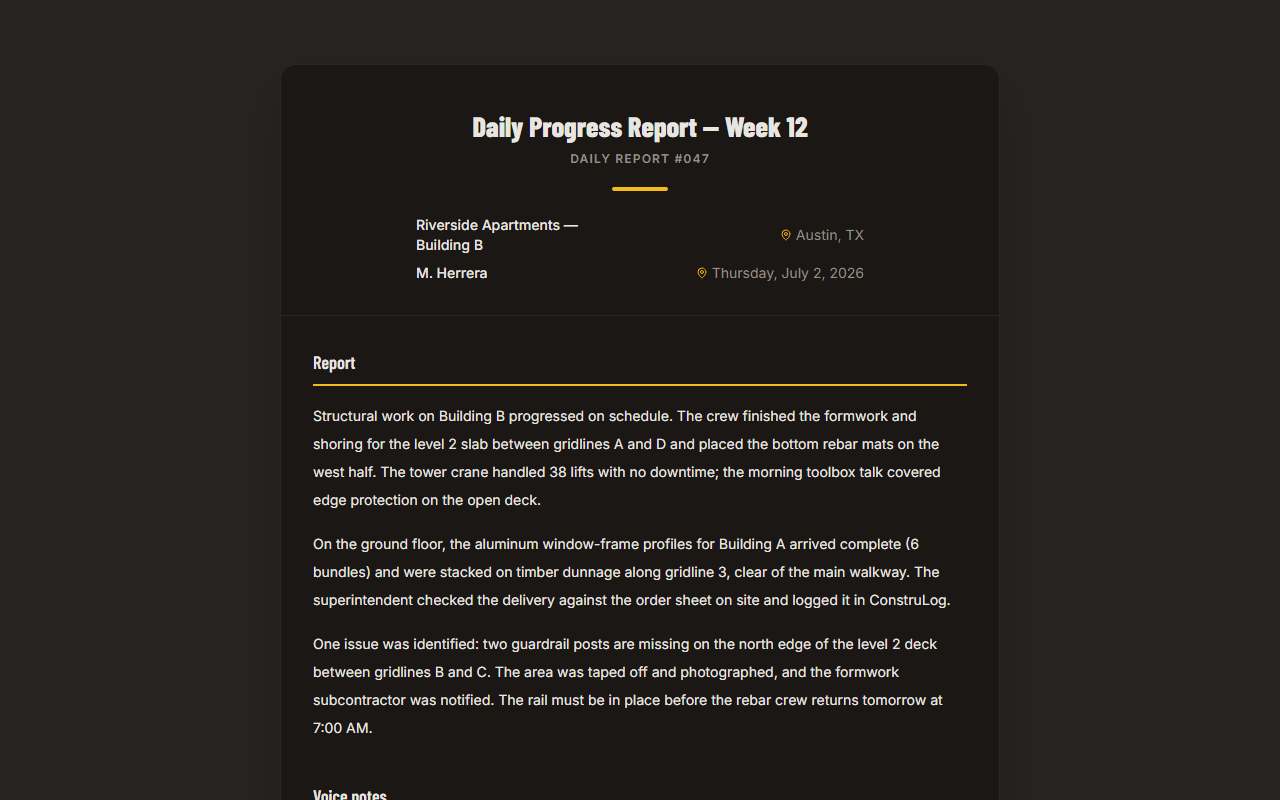
The ConstruLog demo report: project details and a written summary generated from site photos, for a fictional project.
ConstruLog's daily log feature drafts a two to five paragraph log from a day's photos, voice notes and comments, covering work performed, personnel, materials and equipment observed, weather, safety, quality and open items for the next day. Weather is looked up from the coordinates of the first geotagged photo of the day, and if no photo has GPS the log is written without weather. The result is a draft: you edit the narrative and you decide what goes out. You can see how the AI step works in how ConstruLog uses AI.
Frequently asked questions
What does a construction daily report sample look like?
It follows a fixed set of sections: header, weather, crew and labor by trade, equipment, work performed, materials delivered, inspections and visitors, safety, delays and open items, photos and sign-off. This page has three complete fictional samples (a residential remodel, a commercial tenant improvement and a sitework job) so you can see each section filled in with real-world detail.
What is a daily report in construction?
A daily report is the written record of one day on a construction site. It is usually written by the superintendent or site manager and covers who was on site, what work was done, what was delivered, what was inspected, any safety events and anything that caused a delay. It is kept as part of the project record. The blank template lists every field.
How do I write a daily work report on a construction site?
Collect facts during the day instead of reconstructing them at night: weather in the morning, headcount at the start of the shift, deliveries as they arrive, inspections right after they happen. Then write the work performed by area, with quantities, and finish with safety, delays and open items. The full routine is in how to write a construction daily report.
What is the best daily report format?
The best format is the one your crew will actually fill in the same way every day. A form with fixed sections, like the one used in these examples, is easy to compare from day to day and makes gaps obvious. Pick PDF to print, Word to edit the layout, or Excel to type with drop-down lists and automatic totals, and keep the same one for the whole project.
How do I show manpower or labor on a daily report?
Use a crew table with one row per trade and company, with headcount, hours and the work area for each row, plus a total row. In the examples here, the Hours column is total labor hours for that row, and each trade listed also appears in the work performed section, so the labor and the work can be matched.
Can I get a construction daily report sample in PDF for free?
The three samples on this page are shown as text and tables, not as a PDF. What you can download for free is the blank construction daily report template in PDF, Word and Excel, with no signup. Fill it in with your own project details, using the examples here as a guide for the level of detail.
How detailed should the work performed section be?
Detailed enough that someone who was not on site can tell where the work happened and how much was done. Name the area, name the activity and add a quantity or extent when you have one, such as 118 LF of pipe set or 24 of 48 sprinkler heads dropped. Avoid phrases like “continued framing” with no location or amount.
Can I copy these examples for my own project?
You can use the structure and the level of detail, but not the facts. Every company, person, quantity and ticket number here is fictional. Write your own entries from what actually happened on your site, and do not record anything you did not observe or confirm. Check your contract, because some owners and agencies require a specific format or extra items.